Web Development · Frameworks
Svelte 5.49 and SvelteKit Remote Functions Changed How Our Team Builds Web Apps
Svelte 5.49 runes and SvelteKit remote functions transform server-client communication. A practical guide with migration stories, code examples, and React comparisons.

Anurag Verma
16 min read

I used to write $: reactive statements in Svelte and convince myself that the dollar-sign-colon syntax was “elegant.” Then I discovered runes, and I realized I had been lying to myself for three years. The old reactive declarations were clever, sure, but they were also confusing to newcomers, impossible to compose across files, and silently broke in ways that made debugging a nightmare.
Our team at CODERCOPS migrated two production SvelteKit applications to Svelte 5 runes over the past year, and the experience fundamentally changed how we think about reactivity in frontend frameworks. When Svelte 5.49 landed in early 2026 alongside SvelteKit’s remote functions, it felt like the final piece clicking into place. This post is a practical walkthrough of everything we learned, the patterns that worked, the mistakes we made, and why we think Svelte’s approach to server-client communication now genuinely competes with (and in several ways surpasses) React Server Components.
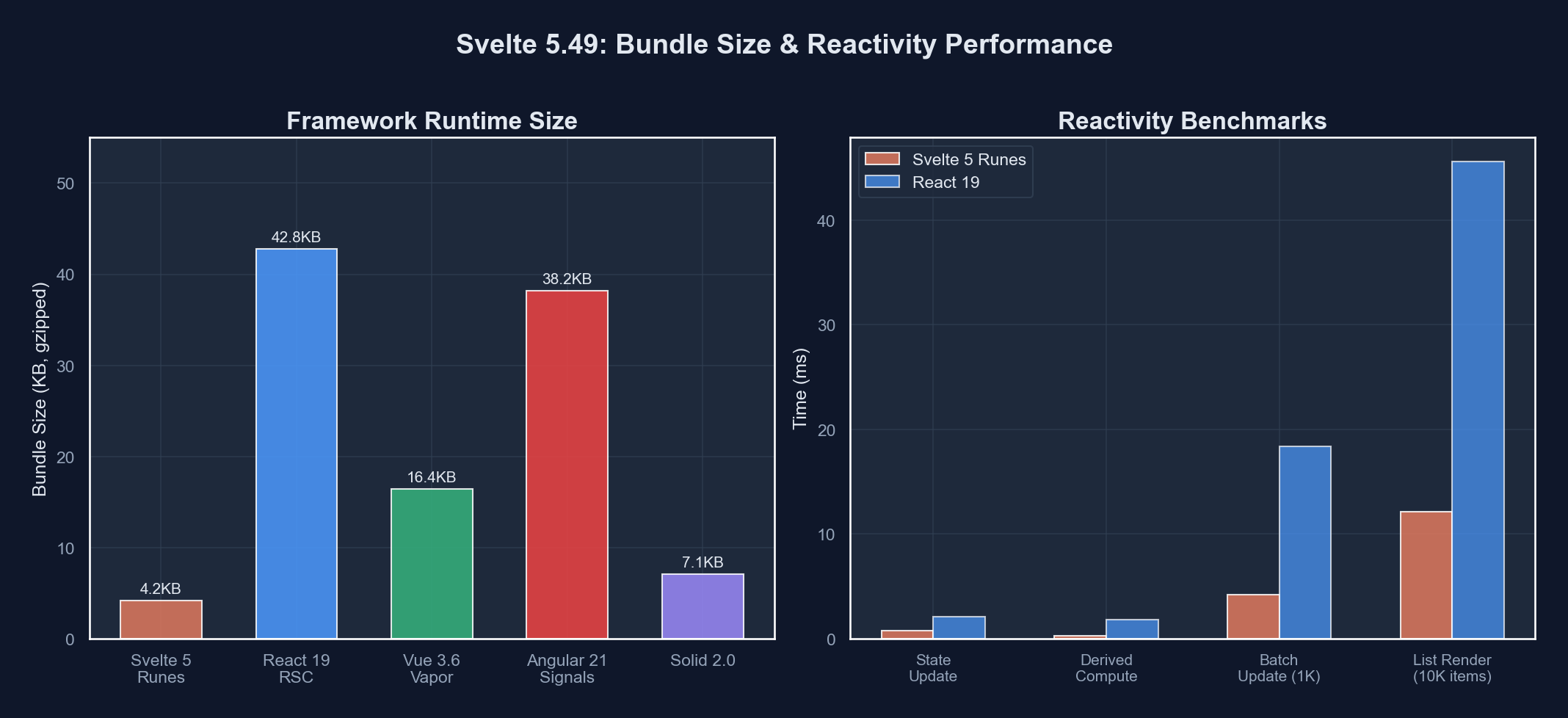 The runes system replaces Svelte’s implicit reactivity with explicit, composable primitives
Why Runes Exist (And Why We Needed Them)
If you have been writing Svelte for a while, you know the old reactive model had some sharp edges. The $: syntax hijacked a JavaScript label statement, which was clever but meant your reactive declarations could not live outside .svelte files. Want to share reactive logic between components? You needed a store. Want to derive a value from a store inside a utility function? Good luck keeping track of subscriptions.
Runes solve this by making reactivity explicit and portable. Here is the core mental model:
| Old Svelte (4.x) | New Svelte (5.x Runes) | What Changed |
|---|---|---|
let count = 0 (implicitly reactive) | let count = $state(0) | Reactivity is opt-in and explicit |
$: doubled = count * 2 | let doubled = $derived(count * 2) | Derived values are composable |
$: { console.log(count) } | $effect(() => { console.log(count) }) | Side effects have clear boundaries |
Svelte stores (writable, derived) | $state in plain .ts files | No more store boilerplate |
export let prop | let { prop } = $props() | Props are destructured, typed naturally |
The difference feels subtle in small examples but becomes enormous in real applications. Let me show you what I mean.
A Real Migration: From Stores to Runes
We had a dashboard component that tracked filter state across multiple child components. The old version looked like this:
// old: src/lib/stores/filters.ts
import { writable, derived } from 'svelte/store';

export const selectedCategory = writable<string>('all');
export const searchQuery = writable<string>('');
export const sortOrder = writable<'asc' | 'desc'>('desc');

export const activeFilterCount = derived(
  [selectedCategory, searchQuery, sortOrder],
  ([$cat, $query, $sort]) => {
    let count = 0;
    if ($cat !== 'all') count++;
    if ($query.length > 0) count++;
    if ($sort !== 'desc') count++;
    return count;
  }
);
Every component that consumed this had to remember to use the $ prefix for auto-subscriptions, and if you accidentally used the store value without the prefix, Svelte would silently give you the store object instead of its value. We caught that bug in production twice.
The runes version:
// new: src/lib/state/filters.svelte.ts
export function createFilters() {
  let selectedCategory = $state<string>('all');
  let searchQuery = $state<string>('');
  let sortOrder = $state<'asc' | 'desc'>('desc');

  let activeFilterCount = $derived(() => {
    let count = 0;
    if (selectedCategory !== 'all') count++;
    if (searchQuery.length > 0) count++;
    if (sortOrder !== 'desc') count++;
    return count;
  });

  return {
    get selectedCategory() { return selectedCategory; },
    set selectedCategory(v: string) { selectedCategory = v; },
    get searchQuery() { return searchQuery; },
    set searchQuery(v: string) { searchQuery = v; },
    get sortOrder() { return sortOrder; },
    set sortOrder(v: 'asc' | 'desc') { sortOrder = v; },
    get activeFilterCount() { return activeFilterCount; }
  };
}The getter/setter pattern looks verbose at first, but it gives you something stores never could: true encapsulation. You can expose read-only derived values, validate writes in setters, and the whole thing is just a function that returns an object. No special store contracts, no subscription management, no $ prefix confusion.
$state and $derived in Practice
After six months of daily runes usage, here are the patterns our team settled on.
$state for Component-Local State
For simple component state, runes are a straight upgrade. No ceremony, no boilerplate:
<script lang="ts">
  let count = $state(0);
  let name = $state('');
  let items = $state<string[]>([]);

  function addItem() {
    items.push(name);
    name = '';
  }
</script>

<input bind:value={name} />
<button onclick={addItem}>Add</button>
{#each items as item}
  <p>{item}</p>
{/each}
<p>Count: {items.length}</p>
One thing that tripped us up: $state makes arrays and objects deeply reactive. That means items.push(name) triggers re-renders automatically. In Svelte 4, you needed items = [...items, name] to trigger reactivity. The new behavior is more intuitive, but if you are migrating, watch out for code that relied on the old immutable-assignment pattern for performance reasons.
$derived for Computed Values
$derived replaced both $: reactive declarations and the derived store. It works exactly like you would expect:
<script lang="ts">
  let items = $state<{ name: string; price: number; quantity: number }[]>([]);

  let totalPrice = $derived(
    items.reduce((sum, item) => sum + item.price * item.quantity, 0)
  );

  let expensiveItems = $derived(
    items.filter(item => item.price > 100)
  );

  let summary = $derived(`${items.length} items, $${totalPrice.toFixed(2)} total`);
</script>$effect for Side Effects
This is where the runes system really shines compared to the old $: blocks. Effects have explicit cleanup, clear dependency tracking, and they only run when their dependencies actually change:
<script lang="ts">
  let searchQuery = $state('');
  let results = $state<SearchResult[]>([]);

  $effect(() => {
    if (searchQuery.length < 3) {
      results = [];
      return;
    }

    const controller = new AbortController();

    fetch(`/api/search?q=${encodeURIComponent(searchQuery)}`, {
      signal: controller.signal
    })
      .then(r => r.json())
      .then(data => { results = data; })
      .catch(() => {});

    return () => controller.abort();
  });
</script>
That cleanup function at the end? It runs automatically before the effect re-runs and when the component is destroyed. In Svelte 4, you needed onDestroy for cleanup and had no way to cancel an in-flight $: block. We had race conditions in production from exactly this pattern.
SvelteKit Remote Functions: The Big Deal
Now we get to the feature that genuinely made our team rethink our architecture. SvelteKit remote functions landed as a stable feature in SvelteKit 2.x, and they solve a problem that every full-stack framework has been trying to solve: how do you call server-side code from the client without writing API endpoints?
React has Server Components and Server Actions. Next.js has 'use server' directives. SvelteKit’s answer is remote functions, and the implementation is remarkably clean.
How Remote Functions Work
You define a function in a +server.ts file or use the remote export convention, and SvelteKit generates the client-side fetch calls, handles serialization, and manages loading states for you:
// src/routes/dashboard/remote.ts
import { db } from '$lib/server/database';
import type { RemoteFunction } from '@sveltejs/kit';

export const getMetrics: RemoteFunction = async (event) => {
  const userId = event.locals.user?.id;
  if (!userId) throw new Error('Unauthorized');

  const metrics = await db.query(`
    SELECT date, pageviews, conversions
    FROM analytics
    WHERE user_id = $1
    AND date > NOW() - INTERVAL '30 days'
    ORDER BY date DESC
  `, [userId]);

  return metrics;
};

export const updatePreferences: RemoteFunction = async (event) => {
  const { theme, timezone } = await event.request.json();

  await db.query(`
    UPDATE user_preferences
    SET theme = $1, timezone = $2
    WHERE user_id = $3
  `, [theme, timezone, event.locals.user.id]);

  return { success: true };
};
And on the client side:
<script lang="ts">
  import { getMetrics, updatePreferences } from './remote';

  let metrics = $state<Metric[]>([]);
  let loading = $state(true);

  $effect(() => {
    getMetrics().then(data => {
      metrics = data;
      loading = false;
    });
  });

  async function saveTheme(theme: string) {
    await updatePreferences({ theme, timezone: 'UTC' });
  }
</script>
What is happening under the hood: SvelteKit compiles that import into a fetch call to an auto-generated API endpoint. The server function never ships to the client bundle. Type safety flows end-to-end because TypeScript knows the return type of the remote function.
 Remote functions create a type-safe bridge between server and client without manual API endpoints
Why This Matters More Than You Think
Before remote functions, our SvelteKit apps had a common pattern: we would load initial data in +page.server.ts load functions, but any subsequent client-side data fetching required us to create +server.ts API endpoints manually. A typical dashboard page might have one load function and four or five additional API endpoints. Each one needed its own file, its own request parsing, its own error handling.
Remote functions collapse all of that into a single file with multiple exported functions. The developer experience improvement is hard to overstate.
Svelte 5.49 vs. React Server Components
Our team runs projects in both Svelte and React, so we have a grounded perspective on this comparison. Here is how the two approaches stack up in practice:
| Feature | Svelte 5.49 + SvelteKit | React 19 + Next.js 15 |
|---|---|---|
| Reactivity model | Runes ($state, $derived) — compiler-driven | useState, useMemo — runtime virtual DOM |
| Server-client boundary | Remote functions with type inference | ’use server’ directives, Server Actions |
| Bundle size | ~3-5 KB framework runtime | ~80-90 KB React runtime |
| Learning curve | Lower — fewer concepts, less boilerplate | Higher — hooks rules, memoization, Suspense |
| Server components | Not needed (SvelteKit SSR + hydration) | Core architecture pattern |
| Form handling | Progressive enhancement built-in | Server Actions, useFormStatus |
| Type safety across boundary | Automatic with remote functions | Requires manual typing or tRPC |
| Ecosystem size | Growing but smaller | Massive, mature |
Here is my honest take: React Server Components are architecturally ambitious but introduce significant complexity. The mental model of “this component runs on the server, this one on the client, and here is where the boundary is” creates a new category of bugs and confusion. I have watched senior developers struggle with 'use client' boundary placement.
Svelte’s approach is simpler. Everything is a component that renders on the server and hydrates on the client (standard SSR). When you need server-only code, you use remote functions or load functions, which are explicitly server-side. There is no ambiguity about where code runs.
That said, React’s ecosystem is vastly larger. If you need a specific library or component, it probably exists for React. The Svelte ecosystem is growing fast, but you will still occasionally write something from scratch that React developers can install from npm.
Real-World Migration: Lessons from Two Production Apps
We migrated two applications over the past year. Here is what we learned.
Migration 1: Internal Analytics Dashboard
This was a SvelteKit app with about 40 components and heavy use of Svelte stores. The migration took our team of three developers about two weeks.
What went smoothly:
- Component-local state migration was almost mechanical. Replace
let x = 0withlet x = $state(0), replace$: y = x * 2withlet y = $derived(x * 2). We wrote a codemod that handled 80% of these. $effectreplacements for$:side-effect blocks were straightforward and actually caught two bugs where we had missing cleanup logic.
What was painful:
- Store-to-runes migration required rethinking shared state architecture. You cannot just swap
writablefor$state— you need to decide where state lives and how it flows. - The
.svelte.tsfile extension requirement broke our ESLint configuration and required updates to our Vite config. Small thing, but it burned half a day. - Some third-party Svelte 4 component libraries did not support runes yet. We had to fork one and update it ourselves.
Migration 2: Client-Facing E-Commerce Storefront
This was larger — about 120 components, a custom checkout flow, and real-time inventory updates. Migration took five weeks.
The key decision: We migrated incrementally. Svelte 5 supports both the old syntax and runes in the same project. We set a rule: new components use runes, existing components get migrated when you touch them for a bug fix or feature. This meant we ran a hybrid codebase for about three months, which was fine. No performance issues, no weird interactions between old and new syntax.
The remote functions win: Our checkout flow previously had seven separate +server.ts API endpoint files for things like calculating shipping, validating coupons, processing payments, and updating inventory. We consolidated all of those into two remote function files. The code reduction was significant, but more importantly, the type safety across the server-client boundary caught three bugs during migration that had been lurking in the old manual fetch calls.
Patterns We Use Daily
After settling into Svelte 5, these are the patterns that appear in almost every component we write.
The State Container Pattern
For shared state that multiple components need:
// src/lib/state/cart.svelte.ts
export function createCart() {
  let items = $state<CartItem[]>([]);

  let total = $derived(
    items.reduce((sum, item) => sum + item.price * item.quantity, 0)
  );

  let itemCount = $derived(
    items.reduce((sum, item) => sum + item.quantity, 0)
  );

  function addItem(product: Product, quantity = 1) {
    const existing = items.find(i => i.productId === product.id);
    if (existing) {
      existing.quantity += quantity;
    } else {
      items.push({
        productId: product.id,
        name: product.name,
        price: product.price,
        quantity
      });
    }
  }

  function removeItem(productId: string) {
    const index = items.findIndex(i => i.productId === productId);
    if (index !== -1) items.splice(index, 1);
  }

  return {
    get items() { return items; },
    get total() { return total; },
    get itemCount() { return itemCount; },
    addItem,
    removeItem
  };
}

// instantiate once, share via context or module-level
export const cart = createCart();
The Remote Function + Effect Pattern
For client-side data that refreshes based on user interaction:
<script lang="ts">
  import { searchProducts } from './remote';

  let query = $state('');
  let category = $state('all');
  let results = $state<Product[]>([]);
  let searching = $state(false);

  $effect(() => {
    if (query.length < 2) {
      results = [];
      return;
    }

    searching = true;
    const currentQuery = query;
    const currentCategory = category;

    searchProducts({ query: currentQuery, category: currentCategory })
      .then(data => {
        if (query === currentQuery && category === currentCategory) {
          results = data;
        }
      })
      .finally(() => { searching = false; });
  });
</script>

<input bind:value={query} placeholder="Search products..." />
<select bind:value={category}>
  <option value="all">All Categories</option>
  <option value="electronics">Electronics</option>
  <option value="clothing">Clothing</option>
</select>

{#if searching}
  <p>Searching...</p>
{:else}
  {#each results as product}
    <ProductCard {product} />
  {/each}
{/if}
Getting Started with Svelte 5.49
If you are starting fresh or considering a migration, here is the practical path forward.
New Project Setup
npx sv create my-app
cd my-app
npm install
npm run dev
The sv CLI (which replaced create-svelte) scaffolds a SvelteKit project with Svelte 5 runes enabled by default. You get TypeScript, Vite, and a sensible project structure out of the box.
Migration from Svelte 4
npx sv migrate svelte-5This runs the official migration tool, which handles most of the mechanical transformations. It will:
- Convert
export letto$props() - Convert
$:reactive declarations to$derivedand$effect - Convert event handlers from
on:clicktoonclick - Flag stores that need manual migration
Key SvelteKit 2.x Improvements Worth Knowing
Beyond remote functions, SvelteKit 2.x brought several quality-of-life improvements that make the framework more pleasant to work with:
- Shallow routing — Update the URL without triggering a full navigation. Perfect for modals and filters.
- Improved error boundaries —
+error.sveltecomponents now receive structured error objects with proper typing. - Snapshot restoration — SvelteKit remembers scroll position and form state when navigating back, out of the box.
- Simplified hooks — The
handle,handleError, andhandleFetchhooks inhooks.server.tshave cleaner APIs. - Asset preloading — SvelteKit automatically preloads assets for linked pages on hover, making navigation feel instant.
Should You Switch?
I am not going to pretend Svelte is the right choice for every project. If you have a large React codebase with a team that knows React well, migrating for the sake of migrating is almost never worth it. Ecosystem maturity matters, hiring matters, and React is not going anywhere.
But if you are starting a new project, especially one where performance and bundle size matter (which is most projects, honestly), Svelte 5 with SvelteKit deserves serious consideration. The runes system is the most intuitive reactivity model I have used in any framework. Remote functions eliminate an entire category of boilerplate. And the compiled output is genuinely tiny compared to React’s runtime overhead.
Our team ships faster in Svelte than in React. That is not a universal claim — it is our experience after a year of building with both. The reduced boilerplate means less code to write, less code to review, and fewer places for bugs to hide.
If you are curious, start with a small side project. Port an existing component. Feel the difference between writing $state(0) and useState(0) plus the rules of hooks plus useCallback plus useMemo. Then decide for yourself.
The Svelte 5.49 release is not revolutionary on its own — it is the culmination of a year of steady improvements since the runes system launched. But the combination of mature runes, remote functions, and SvelteKit 2.x’s polish makes this the best version of Svelte that has ever existed. And if the trajectory holds, it is only going to get better from here.
More from this category
More from Web Development
 R.01
R.01 Node.js vs Deno vs Bun in 2026: The JavaScript Runtime Wars
 R.02
R.02 WASI 0.3 Arrives: Native Async Makes WebAssembly a Real Server-Side Contender
 R.03
R.03 Astro 6 Beta — CSP Nonces, Declarative Web Components, and Architecture Tradeoffs
The dispatch
Working notes from
the studio.
A short letter twice a month — what we shipped, what broke, and the AI tools earning their keep.
Discussion
Join the conversation.
Comments are powered by GitHub Discussions. Sign in with your GitHub account to leave a comment.