Web Development · Libraries
jQuery 4.0 Is Released -- And It Still Matters
jQuery 4.0.0 dropped on January 17, 2026 -- the first major version in nearly a decade. Here's what's new, why jQuery still matters, and who should care about this release.

Anurag Verma
10 min read

On January 17, 2026, the jQuery team released version 4.0.0 — the library’s first major version update in nearly a decade, and a 20-year milestone for one of the most influential projects in web development history. In an era dominated by React, Vue, Svelte, and a parade of new JavaScript frameworks, a jQuery major release might seem like a relic. But the numbers tell a different story.
jQuery is not just surviving. It is quietly powering an enormous portion of the internet, and version 4.0 is a thoughtful modernization that ensures it will continue to do so.
jQuery by the Numbers
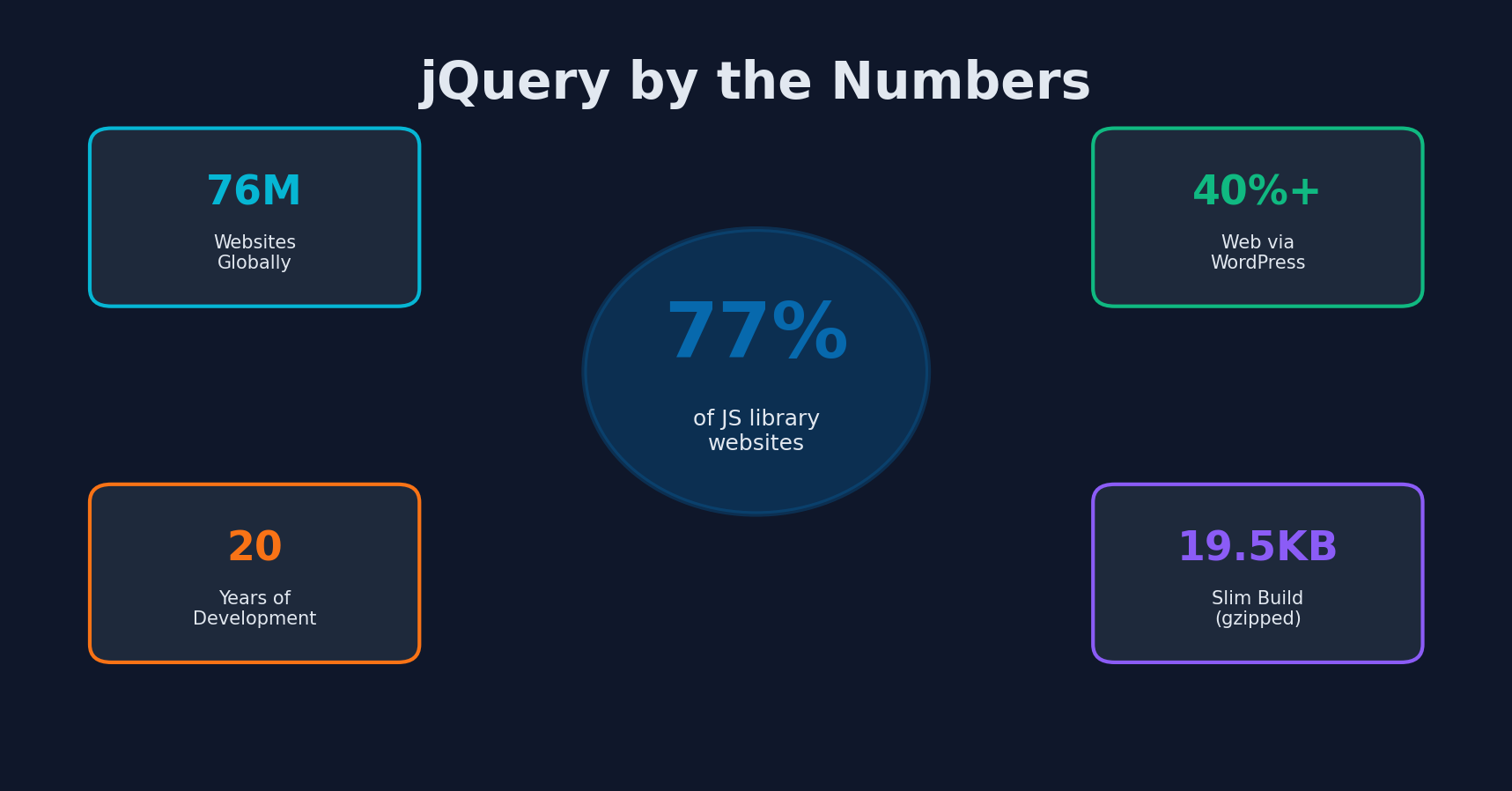 jQuery by the numbers: still powering 77% of JavaScript-enabled websites after 20 years
Before diving into what is new in 4.0, let us confront the elephant in the room: does jQuery still matter?
The data is unambiguous. jQuery remains the most widely used JavaScript library on the web. As of early 2026:
- 77% of all websites that use a known JavaScript library use jQuery (W3Techs)
- jQuery is present on approximately 76 million websites globally
- WordPress, which powers over 40% of all websites, includes jQuery by default
- Bootstrap 4 and earlier (still widely deployed) depends on jQuery
- Countless enterprise applications, government websites, and CMS-driven sites rely on jQuery
The developer community on Twitter and Hacker News may have moved on, but the actual web has not. jQuery 4.0 matters because the web it serves is massive.
What Is New in jQuery 4.0
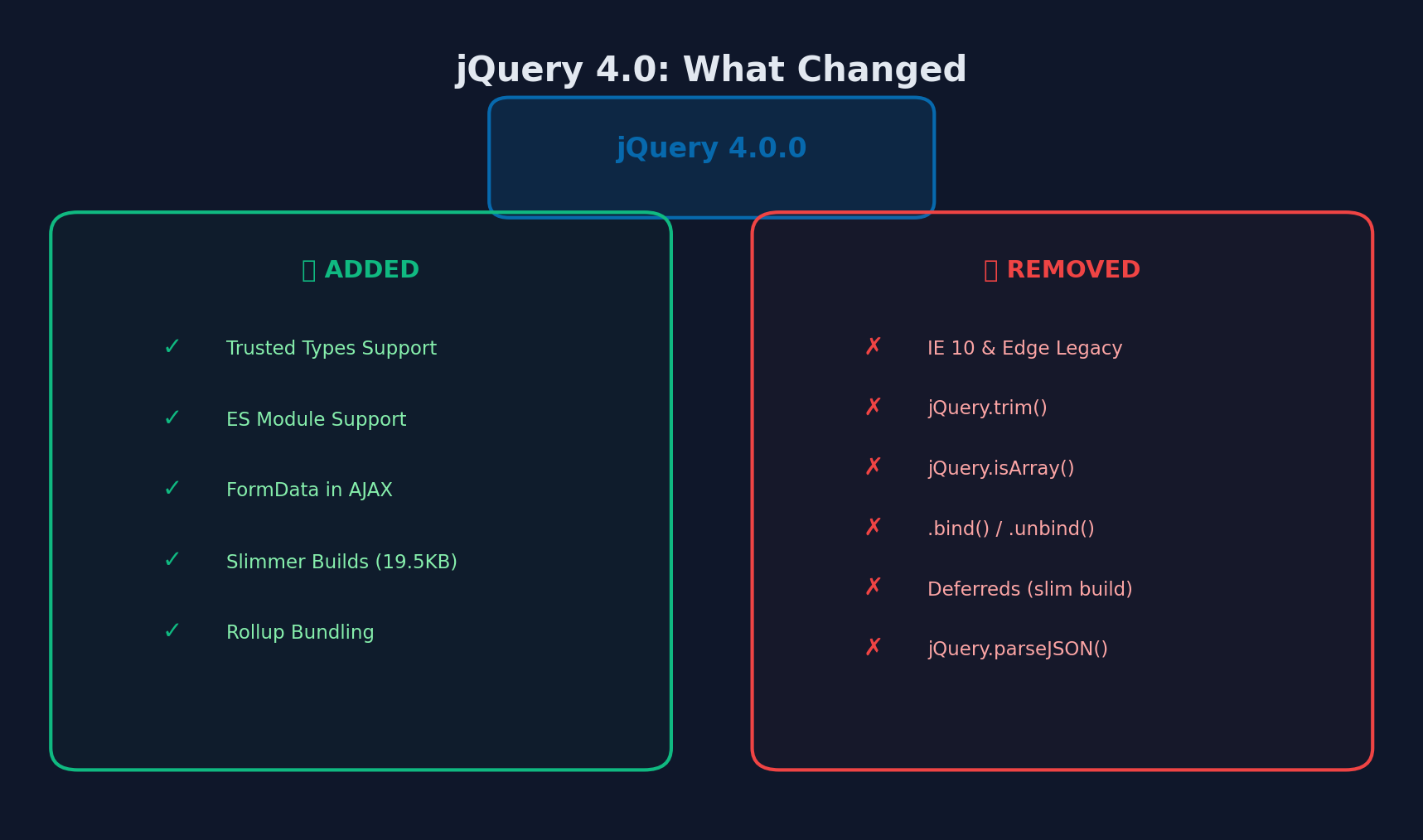 jQuery 4.0 at a glance: Trusted Types and ES modules added, legacy browser support and deprecated APIs removed
jQuery 4.0 is not a revolutionary rewrite. It is a careful modernization that trims legacy code, embraces modern JavaScript, and improves security — all while maintaining the backward compatibility that jQuery’s user base demands.
Trusted Types Support
The headline security feature in jQuery 4.0 is support for Trusted Types, a browser API that helps prevent cross-site scripting (XSS) attacks.
// With Trusted Types CSP enabled, raw string HTML injection is blocked.
// jQuery 4.0 now works correctly with Trusted Types policies.

// Before jQuery 4.0: This could trigger a CSP violation
// with Trusted Types enabled
$('#content').html('<div>User content</div>');

// jQuery 4.0: Works with Trusted Types when a policy is defined
if (window.trustedTypes && trustedTypes.createPolicy) {
    const policy = trustedTypes.createPolicy('jquery-html', {
        createHTML: (string) => DOMPurify.sanitize(string)
    });
}
// jQuery 4.0 respects the Trusted Types policy automatically
$('#content').html('<div>User content</div>');
For organizations running strict Content Security Policies, this is a significant improvement that removes a major barrier to keeping jQuery in security-conscious environments.
ES Module Support
jQuery 4.0 has migrated its source from AMD modules to ES modules and switched to Rollup for packaging. This means you can now import jQuery using standard ES module syntax:
// jQuery 4.0: Native ES module import
import $ from 'jquery';

// Works with modern build tools (Vite, Rollup, Webpack 5+)
// Enables proper tree-shaking in bundlers that support it

$(document).ready(() => {
    console.log('jQuery 4.0 loaded as ES module');
});
You can also use the module directly in the browser:
<script type="module">
    import $ from './jquery.module.js';

    $('h1').text('Loaded via ES module!');
</script>
This modernization makes jQuery compatible with contemporary build workflows and development tools.
Slimmer Builds
The slim build has gotten significantly smaller in jQuery 4.0 with the removal of Deferreds and Callbacks. The slim build now weighs approximately 19.5KB gzipped — lighter than many “modern” alternatives.
| Build | Size (gzipped) | What’s Removed |
|---|---|---|
| Full | ~27KB | Nothing |
| Slim | ~19.5KB | Deferreds, Callbacks, AJAX, Effects |
Deferreds are no longer necessary now that native Promises are universally supported. If your project uses Promises (and it should), the slim build gives you everything you need at a remarkably small footprint.
Dropped Legacy Browser Support
jQuery 4.0 finally drops support for browsers that virtually no one needs to support anymore:
- Internet Explorer 10 and older — Dropped entirely
- Edge Legacy (pre-Chromium) — Dropped
- iOS versions older than the last 3 — Dropped
- Firefox versions older than the last 2 — Dropped
- Android Browser — Dropped
Internet Explorer 11 remains supported for now, which is pragmatic given that some enterprise and government environments still require it.
This pruning allows the jQuery team to remove significant chunks of legacy code — workarounds, polyfills, and conditional branches that existed solely to support ancient browsers.
Binary Data in AJAX
jQuery.ajax now supports binary data, including FormData objects:
// jQuery 4.0: Native FormData support in $.ajax()
const formData = new FormData();
formData.append('file', fileInput.files[0]);
formData.append('description', 'Upload via jQuery 4.0');

$.ajax({
    url: '/api/upload',
    method: 'POST',
    data: formData,
    // No need to manually set Content-Type or processData
    // jQuery 4.0 handles FormData automatically
    success: function(response) {
        console.log('Upload complete:', response);
    }
});
Previously, uploading files via $.ajax() required setting processData: false and contentType: false manually. jQuery 4.0 detects FormData and handles the configuration automatically.
Removed Deprecated APIs
jQuery 4.0 removes several APIs that were deprecated in earlier versions. Here are the most commonly used ones and their modern replacements:
| Removed API | Replacement |
|---|---|
jQuery.trim(str) | str.trim() |
jQuery.isArray(obj) | Array.isArray(obj) |
jQuery.parseJSON(str) | JSON.parse(str) |
jQuery.now() | Date.now() |
jQuery.isFunction(obj) | typeof obj === 'function' |
jQuery.isNumeric(val) | !isNaN(parseFloat(val)) && isFinite(val) |
.bind() / .unbind() | .on() / .off() |
.delegate() / .undelegate() | .on() / .off() with selector |
All of these removed APIs have native JavaScript equivalents that are supported in every browser jQuery 4.0 targets.
Migrating from jQuery 3 to jQuery 4
The jQuery team has provided comprehensive migration tooling to make the upgrade as smooth as possible.
Step 1: Install the jQuery Migrate Plugin
<!-- Add jQuery Migrate BEFORE upgrading to jQuery 4 -->
<script src="jquery-4.0.0.js"></script>
<script src="jquery-migrate-4.0.0.js"></script>
The Migrate plugin restores the removed APIs temporarily and logs console warnings for every deprecated feature your code uses. This gives you a clear checklist of what needs to change.
Step 2: Review Console Warnings
Open your browser console and exercise your application. The Migrate plugin will output warnings like:
JQMIGRATE: jQuery.isFunction() is deprecated. Use typeof x === "function" instead.
JQMIGRATE: jQuery.trim() is deprecated. Use String.prototype.trim instead.
JQMIGRATE: .bind() is deprecated. Use .on() instead.
Step 3: Fix Each Warning
Work through the warnings systematically. Most are straightforward find-and-replace operations:
// Before (jQuery 3)
if ($.isFunction(callback)) {
    var trimmed = $.trim(userInput);
    var parsed = $.parseJSON(response);
    $button.bind('click', handler);
}

// After (jQuery 4)
if (typeof callback === 'function') {
    const trimmed = userInput.trim();
    const parsed = JSON.parse(response);
    $button.on('click', handler);
}
Step 4: Remove the Migrate Plugin and Test
Once all warnings are resolved, remove the Migrate plugin and test thoroughly. Your application should now run cleanly on jQuery 4.0.
Step 5: Audit Third-Party jQuery Plugins
This is often the most time-consuming part of the migration. Third-party jQuery plugins may use deprecated APIs internally. Check for updated versions of any plugins you use, and test each one against jQuery 4.0.
Who Should Still Use jQuery in 2026?
jQuery is not the right choice for every project, but it remains the best choice for many. Here is a practical decision framework.
Use jQuery When:
- You are building on WordPress and your theme or plugin needs DOM manipulation
- You are maintaining a legacy application that already uses jQuery heavily
- You need broad browser support including IE11
- You are building a content-driven website (marketing site, blog, portfolio) with modest interactivity
- Your team knows jQuery and the project does not justify the learning curve of a new framework
- You are adding interactivity to server-rendered pages (Rails, Django, Laravel, PHP)
- Bundle size matters and you need a small library that does a lot (19.5KB slim)
Consider Alternatives When:
- You are building a complex single-page application with extensive client-side state management
- You are starting a greenfield project with a team experienced in modern frameworks
- You need a component architecture with reusable, encapsulated UI elements
- You are building a data-heavy dashboard that requires fine-grained reactivity
- Server-side rendering and hydration are requirements
The “Sprinkle of Interactivity” Sweet Spot
jQuery excels in a pattern that many modern frameworks overcomplicate: adding interactive behavior to server-rendered HTML. If your backend renders the HTML and you need to add dropdowns, form validation, animations, AJAX calls, and event handling, jQuery does this with less ceremony than any alternative.
// jQuery 4.0: Simple, readable interactivity for server-rendered pages
$(document).ready(function() {
    // Form validation
    $('form.contact').on('submit', function(e) {
        const email = $('#email').val().trim();
        if (!email.includes('@')) {
            e.preventDefault();
            $('#email-error').text('Please enter a valid email').show();
        }
    });

    // Lazy-load images
    $('img[data-src]').each(function() {
        const observer = new IntersectionObserver((entries) => {
            entries.forEach(entry => {
                if (entry.isIntersecting) {
                    $(entry.target).attr('src', $(entry.target).data('src'));
                    observer.unobserve(entry.target);
                }
            });
        });
        observer.observe(this);
    });

    // AJAX content loading
    $('.load-more').on('click', function() {
        const page = $(this).data('page');
        $.get(`/api/posts?page=${page}`, function(data) {
            $('#post-list').append(data);
        });
        $(this).data('page', page + 1);
    });
});
jQuery 4.0 and the Modern Web Ecosystem
jQuery 4.0’s modernization efforts — ES modules, Trusted Types, FormData support — demonstrate that the library is not stuck in 2006. It is evolving to remain compatible with how the modern web works.
Coexistence with Modern Frameworks
jQuery 4.0 can coexist with modern frameworks when needed. This is a common pattern in large organizations migrating incrementally from jQuery-based pages to React or Vue:
// jQuery 4.0 coexisting with a React component on the same page
// jQuery handles the legacy parts of the page
$('.legacy-dropdown').on('change', function() {
    const value = $(this).val();
    // Dispatch a custom event that React can listen for
    window.dispatchEvent(new CustomEvent('dropdown-change', {
        detail: { value }
    }));
});

// React component listens for the jQuery-driven event
// useEffect(() => {
//     const handler = (e) => setDropdownValue(e.detail.value);
//     window.addEventListener('dropdown-change', handler);
//     return () => window.removeEventListener('dropdown-change', handler);
// }, []);
WordPress and jQuery 4.0
WordPress’s relationship with jQuery is particularly important. WordPress core has been gradually reducing its jQuery dependency, but jQuery remains included and widely used by themes and plugins. jQuery 4.0’s smaller size and improved security are meaningful improvements for the WordPress ecosystem.
WordPress plugin developers should begin testing their plugins against jQuery 4.0 now, using the Migrate plugin to identify issues, even if WordPress core does not bundle jQuery 4.0 immediately.
Practical Takeaways
-
If you maintain jQuery-based projects, upgrade to 4.0. The security improvements (Trusted Types), reduced bundle size, and modernized internals are worthwhile, and the migration path is well-supported.
-
Use the jQuery Migrate plugin. It makes the upgrade process systematic and low-risk.
-
Audit your jQuery plugins. Third-party plugins are the most likely source of upgrade issues. Check for jQuery 4.0-compatible versions.
-
Do not be embarrassed about using jQuery. It is a practical, well-maintained tool that solves real problems. Using it is a valid engineering decision, not a failure to keep up with trends.
-
Learn modern JavaScript alongside jQuery. Many of the APIs removed in jQuery 4.0 have native equivalents. Learning them makes you a better developer and prepares you for the gradual transition away from jQuery if and when that makes sense for your projects.
jQuery at 20 years old is not the exciting new thing. It is something better for the millions of websites that depend on it: a reliable, well-maintained, incrementally modernizing tool that keeps the web running. Version 4.0 is proof that the jQuery team understands this responsibility and takes it seriously.
More from this category
More from Web Development
 R.01
R.01 Node.js vs Deno vs Bun in 2026: The JavaScript Runtime Wars
 R.02
R.02 WASI 0.3 Arrives: Native Async Makes WebAssembly a Real Server-Side Contender
 R.03
R.03 Astro 6 Beta — CSP Nonces, Declarative Web Components, and Architecture Tradeoffs
The dispatch
Working notes from
the studio.
A short letter twice a month — what we shipped, what broke, and the AI tools earning their keep.
Discussion
Join the conversation.
Comments are powered by GitHub Discussions. Sign in with your GitHub account to leave a comment.