Web Development · Frameworks
Astro 6 Beta: First-Class Edge Computing with Cloudflare Workers Changes Everything
Astro 6 Beta brings a redesigned dev server, first-class Cloudflare Workers support, live content collections, and major performance improvements. Here's what developers need to know about migrating from Astro 5.

Anurag Verma
10 min read

The Astro framework has been on a remarkable trajectory since its inception, and the release of Astro 6 Beta in early 2026 marks perhaps its most significant evolution yet. Coming on the heels of Cloudflare’s acquisition of the Astro Technology Company, this release delivers first-class edge computing support, a completely redesigned development server, and a suite of features that close the gap between development and production environments.
If you have been building content-driven websites with Astro 5, this release demands your attention. Here is everything you need to know about Astro 6 Beta, including migration guidance, new APIs, and what the Cloudflare partnership means for the framework’s future.
The Cloudflare Acquisition: Context That Matters
Before diving into the technical details, it is important to understand the backdrop. In January 2026, Cloudflare announced that the Astro Technology Company team would be joining Cloudflare. The framework remains open source, but the partnership means Astro now has the backing of one of the world’s largest edge computing platforms.
This acquisition is not just corporate news. It directly shaped Astro 6’s feature set. The first-class Cloudflare Workers support, the redesigned development server running on workerd, and the tighter integration with edge runtimes are all products of this partnership.
The Redesigned Development Server
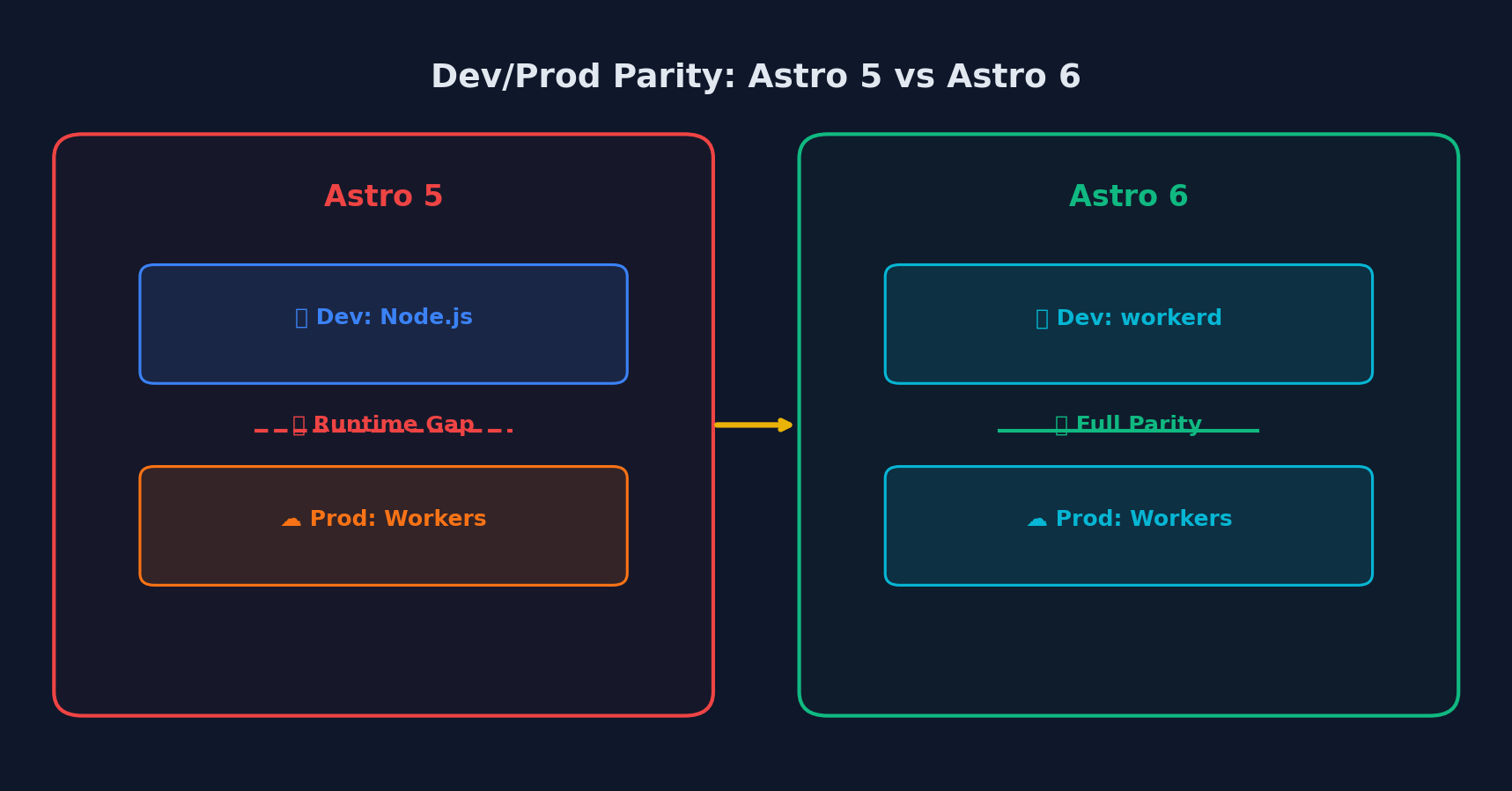 Astro 6 eliminates the runtime gap between development and production environments
The headline feature of Astro 6 is a completely rebuilt development server (astro dev). Previous versions of Astro had a gap between how your application ran in development versus production. In development, your server-side code ran in Node.js regardless of your deployment target. In production, it ran in whatever runtime your hosting provider used, whether that was Cloudflare Workers, Deno, or something else.
Astro 6 eliminates this gap by leveraging Vite’s Environment API to run your application inside the same runtime as production during development.
Running on workerd in Development
For Cloudflare deployments, astro dev now runs your entire application using workerd, Cloudflare’s open-source JavaScript runtime. This is the same runtime that powers Cloudflare Workers in production, not a simulation or polyfill.
# Install Astro 6 Beta
npm install astro@beta

# Create a new Astro 6 project with Cloudflare
npm create astro@latest -- --template cloudflare
Here is what a typical astro.config.mjs looks like with the Cloudflare adapter in Astro 6:
// astro.config.mjs
import { defineConfig } from 'astro/config';
import cloudflare from '@astrojs/cloudflare';

export default defineConfig({
  output: 'server',
  adapter: cloudflare({
    platformProxy: {
      enabled: true,
    },
  }),
});
The key difference from Astro 5 is that when you run astro dev, your server-side code now executes inside workerd. This means you can access Cloudflare-specific APIs like KV, D1, R2, and Durable Objects directly during development:
// src/pages/api/data.ts
export async function GET({ locals }) {
  // In Astro 6, this works identically in dev and production
  const db = locals.runtime.env.DB;
  const results = await db.prepare(
    'SELECT * FROM posts ORDER BY created_at DESC LIMIT 10'
  ).all();

  return new Response(JSON.stringify(results), {
    headers: { 'Content-Type': 'application/json' },
  });
}
What Changed from Astro 5
In Astro 5, the Cloudflare adapter exposed platform APIs through Astro.locals.runtime. In Astro 6, this has been replaced with direct platform API access. The old pattern:
// Astro 5 (deprecated)
const runtime = Astro.locals.runtime;
const kv = runtime.env.MY_KV;
Has been updated to use the platform’s native access patterns, bringing Astro closer to how Cloudflare Workers actually operate.
Live Content Collections Are Now Stable
Live Content Collections, first introduced as experimental in Astro 5.10, have graduated to stable in Astro 6. This feature unlocks something developers have wanted for a long time: updating content data in real time without requiring a full site rebuild.
// src/content.config.ts
import { defineLiveCollection, z } from 'astro:content';

const blog = defineLiveCollection({
  type: 'content',
  schema: z.object({
    title: z.string(),
    pubDate: z.date(),
    author: z.string(),
    tags: z.array(z.string()),
  }),
  loader: async () => {
    // Fetch from a CMS, database, or API
    const response = await fetch('https://api.example.com/posts');
    return response.json();
  },
});

export const collections = { blog };
Live collections are particularly powerful when combined with Cloudflare Workers, because you can query data at the edge with minimal latency. You could connect a D1 database, a KV store, or any external API, and your content updates without redeploying.
Content Security Policy (CSP) Support
Content Security Policy support, previously experimental in Astro 5.9, is now stable. CSP headers help protect your site against cross-site scripting (XSS) and code injection attacks by strictly controlling which resources can execute.
// astro.config.mjs
import { defineConfig } from 'astro/config';

export default defineConfig({
  security: {
    csp: {
      directives: {
        'default-src': ["'self'"],
        'script-src': ["'self'", "'nonce'"],
        'style-src': ["'self'", "'unsafe-inline'"],
        'img-src': ["'self'", 'data:', 'https:'],
      },
    },
  },
});
Astro 6 automatically generates and injects nonces for inline scripts and styles, so you get strong CSP protection without manually managing nonce values. This is a significant security improvement that comes essentially for free.
Server Islands Security Improvements
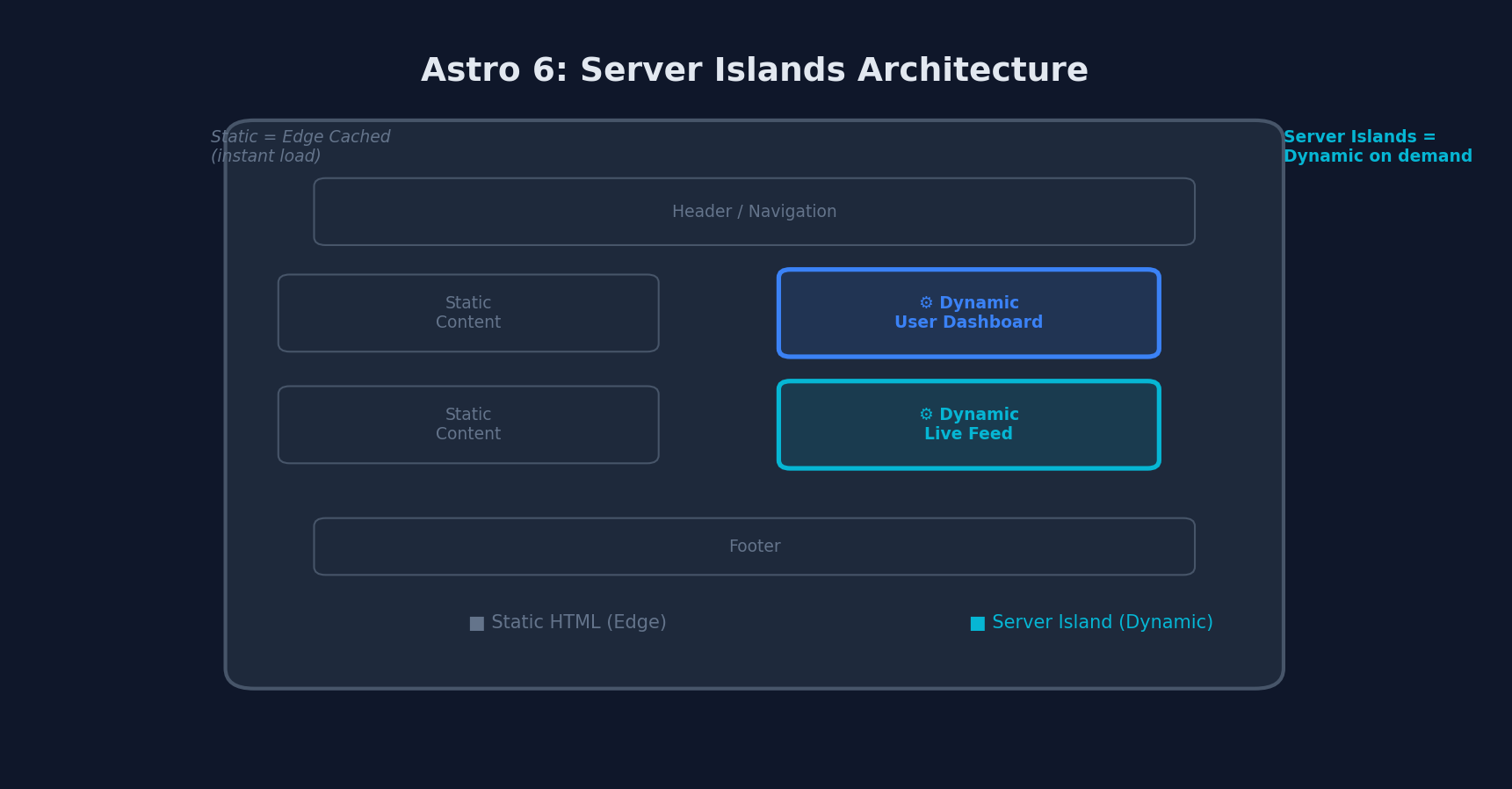 Server Islands: static HTML loads instantly from the edge, dynamic islands hydrate on demand
Server Islands, one of Astro’s most innovative features, receive a security upgrade in version 6. Slot content transmitted to the browser is now encrypted before transmission, matching the security model already used for props. This prevents injection attacks and improves the integrity of dynamically rendered island content.
---
// This component renders on the server, even on cached pages
---
<div>
  <!-- Slot content is now encrypted in transit -->
  <slot />
  <p>User-specific content: {Astro.locals.user.name}</p>
</div>
The Fonts API
Astro 6 introduces a built-in Fonts API that gives you granular control over which font files are downloaded. You can specify the same font multiple times with different configurations, and Astro will intelligently merge the results to download only the required files:
// astro.config.mjs
import { defineConfig } from 'astro/config';

export default defineConfig({
  fonts: [
    {
      family: 'Inter',
      weights: [400, 500, 600, 700],
      subsets: ['latin'],
      display: 'swap',
    },
    {
      family: 'JetBrains Mono',
      weights: [400, 700],
      subsets: ['latin'],
      display: 'swap',
    },
  ],
});
This eliminates the need for third-party font optimization packages and ensures your fonts are loaded in the most performant way possible.
Migration Guide: Astro 5 to Astro 6
The Astro team has published a comprehensive upgrade guide. Here are the most significant breaking changes you need to address.
Node.js 22 Required
Astro 6 requires Node.js 22 or later. If you are still on Node 18 or 20, you will need to upgrade first:
# Check your Node version
node --version

# Install Node 22 via nvm
nvm install 22
nvm use 22
Removed APIs
Several deprecated APIs have been removed:
| Removed API | Replacement |
|---|---|
Astro.glob() | import.meta.glob() |
emitESMImage() | Use getImage() from astro:assets |
<ViewTransitions /> | <ClientRouter /> |
Astro.locals.runtime (Cloudflare) | Direct platform API access |
Zod 4 Upgrade
Astro 6 upgrades to Zod 4. If you use Zod schemas in your content collections, review your schemas for compatibility:
// Most schemas work unchanged, but check for edge cases
import { z } from 'astro:content';

const schema = z.object({
  title: z.string(),
  // Zod 4 has improved error messages and performance
  count: z.number().int().positive(),
});
i18n Default Behavior Change
The default behavior for i18n.redirectToDefaultLocale has been adjusted for better SEO and routing consistency. If you rely on the previous behavior, you may need to explicitly set this option.
Step-by-Step Migration
# 1. Update Astro and all integrations
npx @astrojs/upgrade

# 2. Update Node.js to 22+
nvm install 22 && nvm use 22

# 3. Replace deprecated APIs
# Find and replace Astro.glob() with import.meta.glob()
# Replace <ViewTransitions /> with <ClientRouter />

# 4. Test your build
npm run build

# 5. Test in development with new server
npm run dev
Performance Benchmarks
While the Astro team has not published official benchmarks for the beta, early reports from the community indicate meaningful improvements:
- Cold start times on Cloudflare Workers are reduced due to the tighter integration between the framework and runtime
- Development server startup is faster thanks to the Vite Environment API refactor
- Build times see incremental improvements from the Zod 4 upgrade and internal optimizations
- Time to First Byte (TTFB) at the edge benefits from the elimination of runtime translation layers
Astro’s core advantage, shipping zero JavaScript by default for static content, remains unchanged. The performance story in Astro 6 is about closing the gap in server-rendered and edge-deployed scenarios.
What This Means for the Astro Ecosystem
The Cloudflare acquisition and Astro 6 release signal a clear direction: Astro is positioning itself as the premier framework for edge-first, content-driven web development. Here is what to expect:
-
Deeper Cloudflare integration: Expect even tighter integration with Cloudflare’s ecosystem, including Workers AI, Vectorize, and Constellation.
-
Edge-first development patterns: The new dev server sets the foundation for a workflow where edge deployment is the default, not an afterthought.
-
Long-term sustainability: Cloudflare’s backing gives Astro the resources and infrastructure to continue evolving without relying solely on open-source funding.
-
Broader adapter support: While Cloudflare gets first-class treatment, the Vite Environment API refactor benefits all adapters, and community adapters for other platforms will benefit from the architectural improvements.
Should You Upgrade Now?
Astro 6 is currently in beta, which means it is not yet recommended for production use. However, there are good reasons to start experimenting:
- If you deploy to Cloudflare, the dev/prod parity alone is worth testing.
- If you use content collections heavily, live collections are a game-changer.
- If security is a priority, the stable CSP support and encrypted Server Islands slots add meaningful protection.
For production sites, wait for the stable v6.0 release. For new projects and experimentation, the beta is stable enough to explore these features and start planning your migration.
# Start experimenting today
npm create astro@latest -- --template blog
cd my-astro-blog
npx astro add @astrojs/cloudflare
npm run dev
Final Thoughts
Astro 6 Beta represents a pivotal moment for the framework. The Cloudflare acquisition could have been a cause for concern, but the team has channeled it into genuinely useful features that address real pain points. The redesigned dev server alone solves one of the most persistent frustrations in edge-first development: the disconnect between local development and production behavior.
For developers building content-heavy websites, marketing sites, documentation, blogs, and e-commerce storefronts, Astro 6 with Cloudflare Workers is shaping up to be a compelling combination of developer experience, performance, and global distribution.
The stable release is expected in the coming months. Start planning your migration now, and you will be ready to take full advantage when it lands.
More from this category
More from Web Development
 R.01
R.01 Node.js vs Deno vs Bun in 2026: The JavaScript Runtime Wars
 R.02
R.02 WASI 0.3 Arrives: Native Async Makes WebAssembly a Real Server-Side Contender
R.03 Astro 6 Beta — CSP Nonces, Declarative Web Components, and Architecture Tradeoffs
The dispatch
Working notes from
the studio.
A short letter twice a month — what we shipped, what broke, and the AI tools earning their keep.
Discussion
Join the conversation.
Comments are powered by GitHub Discussions. Sign in with your GitHub account to leave a comment.