AI Integration · Enterprise
Microsoft Launches AI QuickStart Programme for Small Businesses: A Developer's Guide
Microsoft's new AI QuickStart Programme aims to help 1,000 SMBs deploy enterprise-ready AI solutions in under three months. Here's what's included and how developers can capitalize on the opportunity.

Anurag Verma
9 min read
On February 6, 2026, Microsoft announced the AI QuickStart Programme, a new initiative designed to help digitally mature enterprises — including small and medium-sized enterprises (SMEs) and large organizations — rapidly deploy practical, enterprise-ready AI solutions. Supported by the Infocomm Media Development Authority (IMDA) and United Overseas Bank (UOB), the programme represents Microsoft’s most targeted push yet to bring AI capabilities to businesses that have the ambition but not necessarily the resources to build AI systems from scratch.
For developers, this programme is not just news about Microsoft’s enterprise strategy. It is a concrete opportunity — both to help SMB clients adopt AI and to build the solutions those businesses need.
Programme Overview
The AI QuickStart Programme is structured around a simple premise: get businesses from “interested in AI” to “running AI in production” within three months, at a capped cost.
Key Parameters
| Parameter | Details |
|---|---|
| Target audience | Digitally mature SMEs and large enterprises (“Digital Leaders”) |
| Project timeline | Up to 3 months per engagement |
| Cost cap | Up to S$20,000 (~US$15,000) per project |
| Includes | Cloud and compute resources, professional services for solution development and implementation |
| Goal | Support 1,000 SMEs in AI adoption |
| Partners | IMDA (Infocomm Media Development Authority), UOB (United Overseas Bank) |
Focus Areas
The programme targets five key business areas where AI can deliver immediate, measurable value:
- Knowledge Mining: Extracting insights from unstructured business documents, emails, and records
- Customer Engagement: AI-powered chatbots, personalized recommendations, and intelligent customer service
- Operations Automation: Streamlining repetitive processes with AI-driven workflow automation
- Content Creation: Generating marketing materials, reports, and communications using generative AI
- Conversational Analytics: AI-powered analysis of customer interactions, sales calls, and support tickets
What Is Included for Businesses
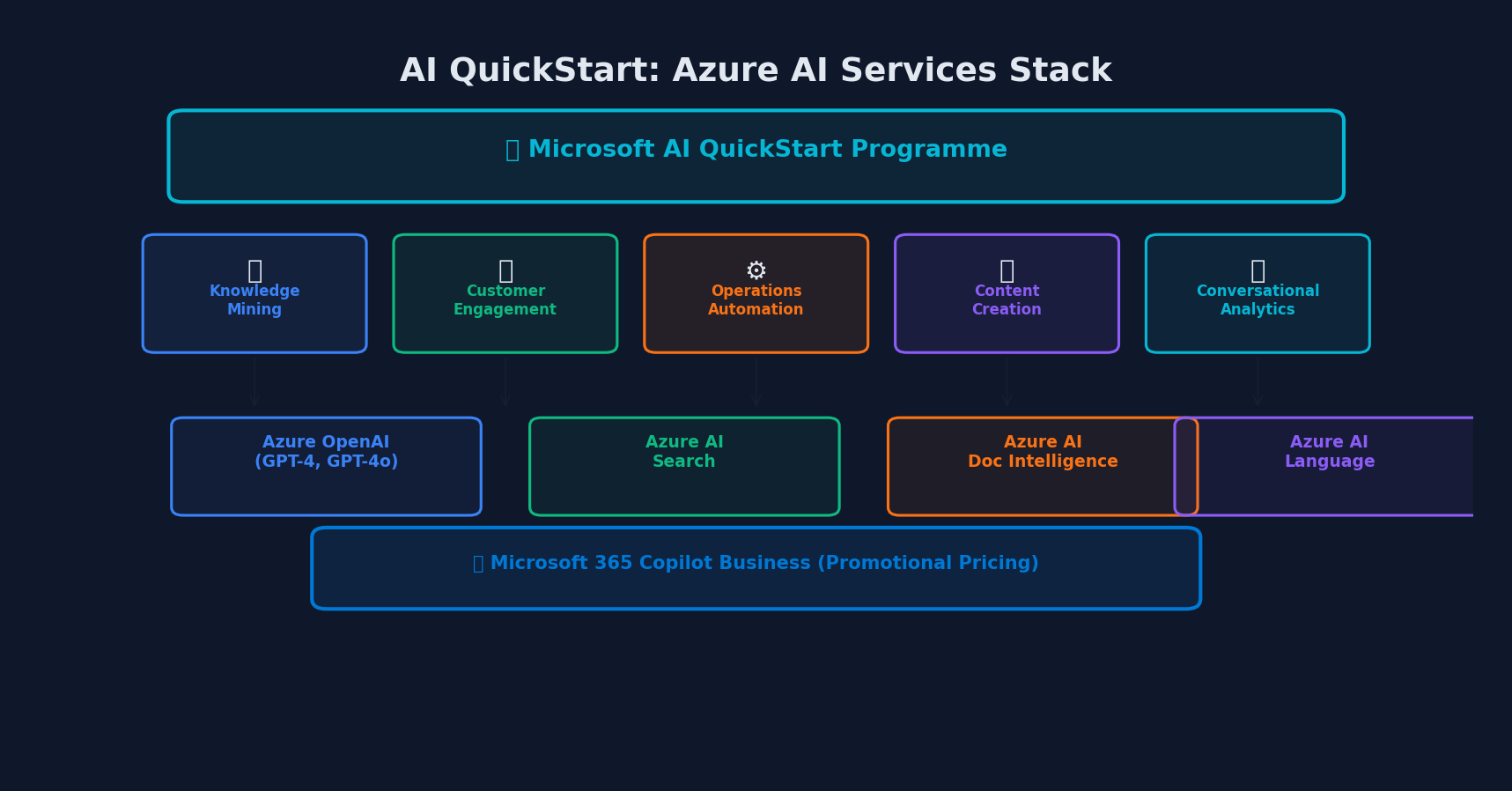 The Azure AI stack: five solution areas powered by Azure OpenAI, AI Search, Document Intelligence, and Language services
The programme bundles several Microsoft tools and services that developers should be familiar with.
Azure AI Services
Participants get access to Azure AI services as part of their project budget, including:
- Azure OpenAI Service: Access to GPT-4, GPT-4o, and other frontier models through Azure’s enterprise-grade infrastructure
- Azure AI Search: Previously known as Azure Cognitive Search, this service enables semantic search, vector search, and hybrid search over business data
- Azure AI Document Intelligence: Extracts structured data from forms, receipts, invoices, and documents
- Azure AI Language: Text analytics, sentiment analysis, named entity recognition, and custom language models
Microsoft Copilot for Business
The programme includes promotional pricing for Microsoft 365 Copilot Business, available until March 2026. Copilot Business integrates AI assistance directly into Word, Excel, PowerPoint, Outlook, and Teams for small business users.
Professional Services
Each project includes professional consulting and development services to design, build, and deploy the AI solution. This is where developer and consulting opportunities arise.
Developer Opportunities
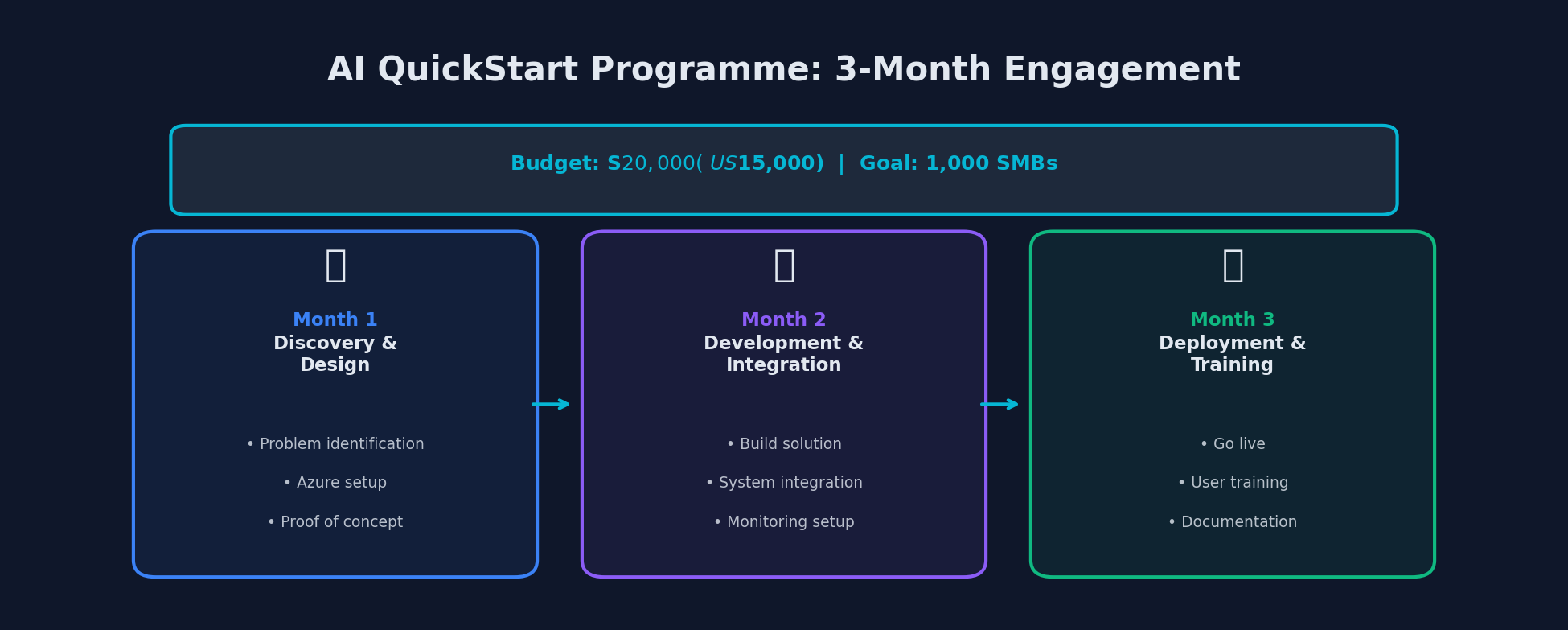 The three-month engagement structure: discovery, development, and deployment within a S$20,000 budget
The AI QuickStart Programme creates a clear pipeline of work for developers who can bridge the gap between Microsoft’s AI platform and business needs.
Building Solutions for SMBs
The three-month, S$20,000 project structure is well-suited to focused, outcome-driven development work. Here is what a typical engagement might look like:
Month 1: Discovery and Design
- Identify the business problem and map it to an AI solution pattern
- Set up Azure infrastructure and configure AI services
- Build and validate a proof of concept
Month 2: Development and Integration
- Build the production solution using Azure AI services
- Integrate with existing business systems (CRM, ERP, email, etc.)
- Implement monitoring, logging, and error handling
Month 3: Deployment and Training
- Deploy to production
- Train business users
- Establish ongoing monitoring and maintenance procedures
- Document the solution for handoff
Technical Patterns for SMB AI Solutions
Here are practical implementation patterns for the five focus areas, using Azure AI services.
Knowledge Mining with Azure AI Search
# Setting up a knowledge mining solution with Azure AI Search
from azure.search.documents import SearchClient
from azure.search.documents.indexes import SearchIndexClient
from azure.search.documents.indexes.models import (
    SearchIndex,
    SearchField,
    SearchFieldDataType,
    SemanticConfiguration,
    SemanticField,
    SemanticPrioritizedFields,
    SemanticSearch,
    VectorSearch,
    HnswAlgorithmConfiguration,
    VectorSearchProfile,
)
from azure.identity import DefaultAzureCredential

credential = DefaultAzureCredential()

# Define an index with vector search for semantic understanding
index = SearchIndex(
    name="business-knowledge-base",
    fields=[
        SearchField(name="id", type=SearchFieldDataType.String, key=True),
        SearchField(name="title", type=SearchFieldDataType.String,
                    searchable=True),
        SearchField(name="content", type=SearchFieldDataType.String,
                    searchable=True),
        SearchField(name="category", type=SearchFieldDataType.String,
                    filterable=True),
        SearchField(
            name="content_vector",
            type=SearchFieldDataType.Collection(SearchFieldDataType.Single),
            searchable=True,
            vector_search_dimensions=1536,
            vector_search_profile_name="vector-profile"
        ),
    ],
    vector_search=VectorSearch(
        algorithms=[HnswAlgorithmConfiguration(name="hnsw-algo")],
        profiles=[
            VectorSearchProfile(
                name="vector-profile",
                algorithm_configuration_name="hnsw-algo"
            )
        ],
    ),
    semantic_search=SemanticSearch(
        configurations=[
            SemanticConfiguration(
                name="semantic-config",
                prioritized_fields=SemanticPrioritizedFields(
                    content_fields=[SemanticField(field_name="content")]
                ),
            )
        ]
    ),
)
Customer Engagement Chatbot
# Building an AI-powered customer service chatbot with Azure OpenAI
from openai import AzureOpenAI

client = AzureOpenAI(
    azure_endpoint="https://<your-resource>.openai.azure.com/",
    api_version="2024-10-21"
)

def create_smb_chatbot(business_context: str):
    """
    Creates a customer engagement chatbot tailored to an SMB's
    specific business context and knowledge base.
    """
    system_prompt = f"""You are a helpful customer service assistant for
    a small business. Here is the business context:

    {business_context}

    Guidelines:
    - Answer questions about products, services, and policies
    - Be friendly and professional
    - If you don't know the answer, offer to connect the customer
      with a human representative
    - Never make up information about products or pricing
    - Keep responses concise but helpful
    """

    def chat(user_message: str, conversation_history: list) -> str:
        messages = [{"role": "system", "content": system_prompt}]
        messages.extend(conversation_history)
        messages.append({"role": "user", "content": user_message})

        response = client.chat.completions.create(
            model="gpt-4o",
            messages=messages,
            temperature=0.3,  # Lower temperature for factual accuracy
            max_tokens=500
        )

        return response.choices[0].message.content

    return chat
Operations Automation
# Automating document processing with Azure AI Document Intelligence
from azure.ai.documentintelligence import DocumentIntelligenceClient
from azure.identity import DefaultAzureCredential

client = DocumentIntelligenceClient(
    endpoint="https://<your-resource>.cognitiveservices.azure.com/",
    credential=DefaultAzureCredential()
)

async def process_invoice(invoice_url: str) -> dict:
    """
    Automatically extract structured data from invoices
    for accounting automation.
    """
    poller = client.begin_analyze_document(
        "prebuilt-invoice",
        analyze_request={"url_source": invoice_url}
    )
    result = poller.result()

    extracted_data = []
    for invoice in result.documents:
        data = {
            "vendor": invoice.fields.get("VendorName", {}).get("content"),
            "invoice_number": invoice.fields.get("InvoiceId", {}).get("content"),
            "date": invoice.fields.get("InvoiceDate", {}).get("content"),
            "total": invoice.fields.get("InvoiceTotal", {}).get("content"),
            "items": []
        }

        items = invoice.fields.get("Items", {}).get("value", [])
        for item in items:
            data["items"].append({
                "description": item.get("Description", {}).get("content"),
                "quantity": item.get("Quantity", {}).get("content"),
                "unit_price": item.get("UnitPrice", {}).get("content"),
                "amount": item.get("Amount", {}).get("content"),
            })

        extracted_data.append(data)

    return extracted_data
Positioning Yourself as a QuickStart Partner
Developers and consultancies looking to participate in the programme ecosystem should:
-
Get Azure AI certified: The Azure AI Engineer Associate (AI-102) and Azure AI Fundamentals (AI-900) certifications demonstrate competence to prospective SMB clients.
-
Build reusable templates: The three-month, capped-budget structure rewards developers who have pre-built solution templates that can be customized quickly.
-
Understand SMB constraints: SMBs have different needs than enterprises. They need solutions that are:
- Simple to maintain (often without a dedicated IT team)
- Cost-predictable (no surprise Azure bills)
- Quick to show ROI (business owners need to justify the investment)
-
Focus on the five target areas: Align your offerings with the programme’s five focus areas to maximize relevance.
Cost Management for SMBs on Azure
One of the biggest concerns for SMBs adopting AI is cost predictability. Here are practical strategies for keeping Azure AI costs within the programme’s budget constraints.
Setting Up Cost Controls
# Set up Azure budget alerts for an SMB project
az consumption budget create \
    --budget-name "ai-quickstart-project" \
    --amount 15000 \
    --category Cost \
    --time-grain Monthly \
    --start-date 2026-02-01 \
    --end-date 2026-05-01 \
    --resource-group "smb-ai-project-rg"

# Set up alerts at 50%, 75%, and 90% thresholds
az consumption budget create \
    --budget-name "ai-quickstart-alerts" \
    --amount 15000 \
    --category Cost \
    --time-grain Monthly \
    --start-date 2026-02-01 \
    --end-date 2026-05-01 \
    --resource-group "smb-ai-project-rg" \
    --notifications '{
        "50pct": {
            "enabled": true,
            "operator": "GreaterThanOrEqualTo",
            "threshold": 50,
            "contactEmails": ["admin@example.com"]
        },
        "75pct": {
            "enabled": true,
            "operator": "GreaterThanOrEqualTo",
            "threshold": 75,
            "contactEmails": ["admin@example.com"]
        }
    }'
Cost Optimization Tips
| Strategy | Savings Potential | Implementation |
|---|---|---|
| Use GPT-4o-mini for simple tasks | 60-80% vs GPT-4o | Route queries by complexity |
| Cache frequent queries | 40-70% on API costs | Redis or Azure Cache |
| Batch document processing | 30-50% vs real-time | Process during off-peak hours |
| Right-size search indexes | 20-40% on search costs | Use the smallest tier that meets performance needs |
| Set token limits | Variable | Configure max_tokens per use case |
The Broader Context: Microsoft’s SMB AI Strategy
The AI QuickStart Programme is part of Microsoft’s broader push to democratize AI for businesses of all sizes. Other recent initiatives include:
- Microsoft 365 Copilot Business: Launched December 2025, bringing Copilot to Microsoft 365 Business Basic and Standard plans at a lower price point than enterprise Copilot
- Community AI Infrastructure: A January 2026 initiative investing in AI infrastructure in underserved communities
- Microsoft for Startups: Up to $150,000 in Azure credits for qualifying startups building AI solutions
For developers, the convergence of these programmes creates a substantial addressable market. SMBs that adopt AI through the QuickStart Programme will need ongoing development, maintenance, and enhancement of their solutions — creating a long-term revenue opportunity for developers who establish themselves early.
Getting Started
If you are a developer looking to participate in the AI QuickStart ecosystem:
- Explore Azure AI services on the free tier to familiarize yourself with the platform
- Build a portfolio project that demonstrates a complete SMB AI solution in one of the five focus areas
- Connect with your regional Microsoft partner network to learn about referral and partnership opportunities
- Study the programme’s published case studies as they become available to understand what successful projects look like
- Invest in Azure certifications to build credibility with business clients
The AI QuickStart Programme signals that Microsoft is serious about making AI accessible beyond the enterprise. For developers who position themselves at the intersection of AI expertise and small business understanding, the opportunity is significant and immediate.
More from this category
More from AI Integration
 R.01
R.01 Google Workspace Gets a Major AI Boost: Gemini Now Powers Docs, Sheets, Slides & Drive
 R.02
R.02 Agentic AI in 2026: Inside Google's Agent Leap Report and the Rise of Autonomous AI
 R.03
R.03 Best AI Coding Models Compared: The Definitive February 2026 Guide
The dispatch
Working notes from
the studio.
A short letter twice a month — what we shipped, what broke, and the AI tools earning their keep.
Discussion
Join the conversation.
Comments are powered by GitHub Discussions. Sign in with your GitHub account to leave a comment.